Last updated: 12 October 2026 | Change log
Pix is a Brazilian instant payment method developed by the Central Bank of Brazil, enabling fast, secure, and cost-effective transactions.
Make yourself familiar with our API principles to ensure a resilient integration.
Product overview
Pix is a payment method that allows your customers to make 24/7 transfers via QR code or unique emv code.
For gambling payments, you must provide identity documents for CPF validation. This includes names and identity documents information.
| Payment type | Country | Acceptance currency | Recurring | Reversals | Partial reversals | Disputes |
|---|---|---|---|---|---|---|
| Bank Transfer | Brasil | BRL | ❌ |
|
| ❌ |
When requesting a refund it is mandatory to provide the reason code.
- Minimum transaction value: 0.01 BRL
- Maximum transaction value: 50,000 BRL
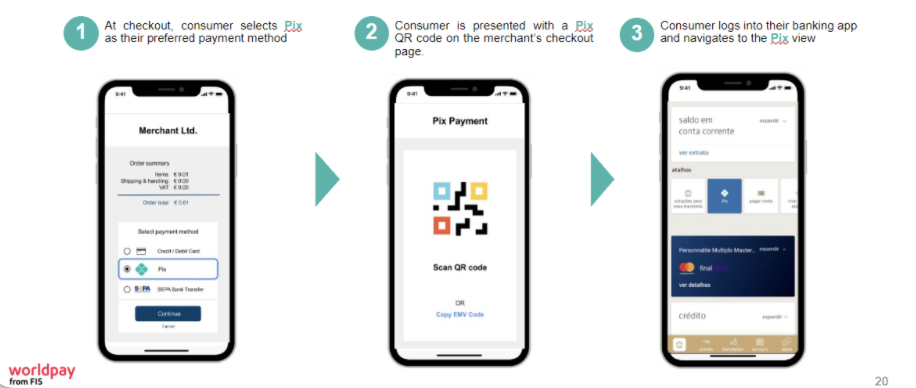
- At checkout, your customer selects Pix as their preferred payment method.
- They are presented with a Pix QR code on your checkout page.
- Your customer logs into their banking app and navigates to the Pix view.
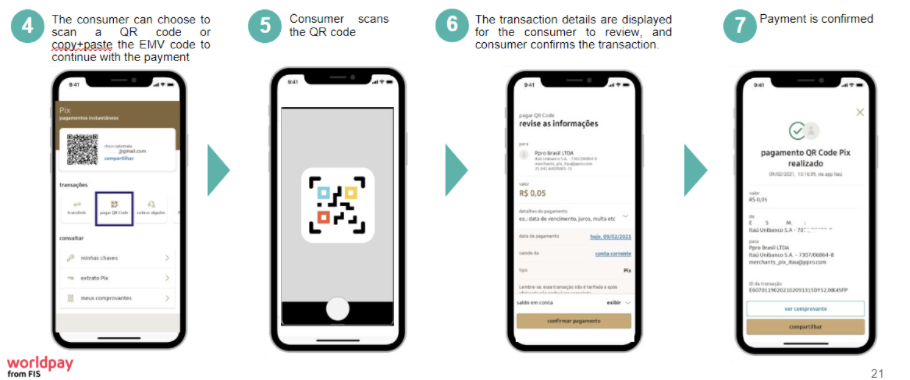
- Your customer can choose to scan a QR code or copy+paste the EMV code to continue with the payment.
- They scan the QR code.
- The transaction details are displayed for your customer to review, and the customer then confirms the payment.
- Payment is confirmed.
Use our API reference and set your headers.
POST https://try.access.worldpay.com/apmPayments
Apply APM payment details directly using our APMs API, or use our Components SDK to create a session.
Collect the APM details and send an API request with these details to create a payment.
- Tryhttps://try.access.worldpay.com/apmPayments
- Livehttps://access.worldpay.com/apmPayments
{
  "transactionReference": "Memory265-13/08/1876",
  "orderReference": "apm-order-12345",
  "merchant": {
    "entity": "default"
  },
  "instruction": {
    "method": "ach",
    "narrative": {
      "line1": "MindPalace"
    },
    "value": {
      "amount": 750,
      "currency": "USD"
    },
    "paymentInstrument": {
      "type": "direct",
      "accountType": "checking",
      "accountNumber": "01234567890123456",
      "routingNumber": "012345678",
      "checkNumber": "012345678901234",
      "companyName": "Worldpay",
      "billingAddress": {
        "address1": "8500 Governors Hill Drive",
        "address2": "Symmes Township",
        "postalCode": "45249",
        "city": "Ohio",
        "state": "US-OH",
        "countryCode": "US"
      }
    },
    "customer": {
      "firstName": "John",
      "lastName": "Johnson",
      "customerId": "43424",
      "email": "john@example.com"
    }
  }
}
For Bizum transactions, please follow this extra regex [a-zA-Z0-9]{4,12}
A reference that you can apply to one or more payments according to your business needs. You may reuse the same reference across multiple payments, for example where:
- the total amount for a single order is split across multiple payments
- you use a single reference for each payment in a recurring agreement or split shipment scenario
{
  "paymentInstrument": {
    "method": "pix",
    "type": "direct"
  },
  "paymentId": "eyJrIjoiYXBtLXNlcnZpY2UtJHtzcHJpbmcucHJvZmlsZXMuYWN0aXZlfSIsImxpbmtWZXJzaW9uIjoiNi4wLjAifQ==.BnnxxcMle38OazhwbF8J+4rtJi8CAq:Y3zUOn1dw6VWfvx:PHL5L0S+5ara5vz6ouV5yBmVUQCiSwQjs+1x5qJIJxAKWMWc2Mlb1doricEYlzsZIRIGCflvnYu1Ns8g1S0+66n6wCELiB9OHfX7cdN8MbBQB9vAYY5mA9Nq7wGjDWpyzMQlvDbyPmj8n3JAiTQW8Eq5Lj6LFzcEh8YV9gCZBzLZbEeWUoPvb2T9Qf55NxtdjYFiEp3rMOHqwYKWa1TJnWx7:xasdm:Pw6YUNDd54rfT6hMMjSKiEe6HkFm9OABSOmQQkCNB2I+LQDvl0dkMgT:LWHf7rure13T5C:wQ6sGi9VYvEB5k55y2sensiXY0Yl+:o+DhIRXOVuFuo+ARMtBeZHQd:UvEu:Hn4G9xGyOnhtYhmEettFU39blHd8:YTicoyChKkMubbmwZVm3Ep4DHaGaITF1cpZDOi7Q==",
  "lastEvent": "pending",
  "outcome": "pending",
  "_links": {
    "self": {
      "href": "https://access.worldpay.com/eyJrIjoiYXBtLXNlcnZpY2UtJHtzcHJpbmcucHJvZmlsZXMuYWN0aXZlfSIsImxpbmtWZXJzaW9uIjoiNi4wLjAifQ==.BnnxxcMle38OazhwbF8J+4rtJi8CAq:Y3zUOn1dw6VWfvx:PHL5L0S+5ara5vz6ouV5yBmVUQCiSwQjs+1x5qJIJxAKWMWc2Mlb1doricEYlzsZIRIGCflvnYu1Ns8g1S0+66n6wCELiB9OHfX7cdN8MbBQB9vAYY5mA9Nq7wGjDWpyzMQlvDbyPmj8n3JAiTQW8Eq5Lj6LFzcEh8YV9gCZBzLZbEeWUoPvb2T9Qf55NxtdjYFiEp3rMOHqwYKWa1TJnWx7:xasdm:Pw6YUNDd54rfT6hMMjSKiEe6HkFm9OABSOmQQkCNB2I+LQDvl0dkMgT:LWHf7rure13T5C:wQ6sGi9VYvEB5k55y2sensiXY0Yl+:o+DhIRXOVuFuo+ARMtBeZHQd:UvEu:Hn4G9xGyOnhtYhmEettFU39blHd8:YTicoyChKkMubbmwZVm3Ep4DHaGaITF1cpZDOi7Q=="
    }
  },
  "_actions": {},
  "redirect": "iVBORw0KGgoAAAANSUhEUgAABbQAAAW0AQAAAAA22bh6AAAKIUlEQVR4nO3ZSxLjNgwFQN5A97+lbqBsbAMEaM9UFoyU6rdw6UMCDe5UHtcjc47/WvDvwr033HvDvTfce8O9N9x7w7033HvDvTfce8O9N9x7w7033HvDvTfce8O9N9x7w7033HvDvTfce8O9N9x7w7033HvDvTfce8O9N9x7w7033HvDvTfce8O9N9x7w7033HvDvTfZPWqOvDJuy6p1geO1o9U729t49kGNP4G4ubm5ubm5ubm5ubm57+zu0Gb8VbPIXotXt2W0qW9u/uXkuLm5ubm5ubm5ubm5uW/v/qHo6z5FOiXeXnOVL9/FK/IaxM3Nzc3Nzc3Nzc3Nzf1AdwDWs5z5bbkdNVPvwludCDc3Nzc3Nzc3Nzc3N/f/zX3mr9fWbFqy1r5TPqKjQEaVqbi5ubm5ubm5ubm5ubkf6F7fnnOf6ap42uJyDqXH+HkiP0Dc3Nzc3Nzc3Nzc3Nzc93WXTM3+k58O4ubm5ubm5ubm5ubm5r69e5V57fvrdeSruI11sW11Vf6kjR1Ze1y/ws3Nzc3Nzc3Nzc3NzX1n91SuVSrG6c/SdYHYsZrlyznkEzk+z856Ntzc3Nzc3Nzc3Nzc3Nw3dxdA4PuHawBK9Xzb52uU0mgi56Pi5ubm5ubm5ubm5ubmfob7aqhSqfWJwoV85b0Nf+ap8rrG4+bm5ubm5ubm5ubm5n6guy8LfHsbbWOq1UDXXODIDfNUZ54vb1uFm5ubm5ubm5ubm5ub+77uWJYp5bb07pQfvach80/MF+OWE+Hm5ubm5ubm5ubm5uZ+kHtK/sot1afb1WdtbGs7pqJl+lhXTqlNwM3Nzc3Nzc3Nzc3NzX1n97HGv/aHe+RnzTjmMc654jRLG+McCdT6cnNzc3Nzc3Nzc3Nzcz/BHWvb/uKJIUvvPkYbfLoq9dph9APi5ubm5ubm5ubm5ubmvr27rY3bCV9QK0/eFm175XL1dYJ2kNzc3Nzc3Nzc3Nzc3Nz3dc/PR1vb8WWChgptTHDMslLlykdVFnNzc3Nzc3Nzc3Nzc3M/yn3OHafq8SxXih3Heqp8NRVdzbI6h3zFzc3Nzc3Nzc3Nzc3NfXP3q+aVi4SilMuFVynN/uJqatRObozphLm5ubm5ubm5ubm5ubnv6y4pW8Odn606Hm1deVuKtjHi2bRjPj5ubm5ubm5ubm5ubm7uu7p/9DlypSDn3jHkl3rxtlDWPyNvK5W5ubm5ubm5ubm5ubm5n+Eun7XNeGR8007z5bZnm+prj1Z5Ok1ubm5ubm5ubm5ubm7ue7uP+eq9tnyfrsudi7f9MFZFv87cJuXm5ubm5ubm5ubm5uZ+jLvgA5WN1/xs0mboNfNicX+Wi07Nyxlyc3Nzc3Nzc3Nzc3NzP8hdFNGs9I5t+Soo72brHefozcfigKYe3Nzc3Nzc3Nzc3Nzc3Ld3fx6NmCBXn75Z11+5V+tdlrR115+myhZubm5ubm5ubm5ubm7uJ7hb9fIN/Ptz9XztyNumKuVYyot8tRqSm5ubm5ubm5ubm5ub+0HuvrWgomN+UZodeUdePDXKU0W3cjZltPyCm5ubm5ubm5ubm5ub++busjXevj25bVSf3uaBSopxzKNNzdvJRbi5ubm5ubm5ubm5ubnv7J42RJ8otyK3+Tq0jPsnfBfkUtzc3Nzc3Nzc3Nzc3NxPcMdPeRbQfBv46accQXGXvfEsX5UzbC25ubm5ubm5ubm5ubm57+ousjZGvBgNmpuVAhN0dQR528iDr5pzc3Nzc3Nzc3Nzc3NzP8BdKl2vtrncmKFjvjo/y6PAVKosGXPWgj49Nzc3Nzc3Nzc3Nzc3953drfDIRTK5f7i++pS9vzztWPqQ+QhObm5ubm5ubm5ubm5u7ke5y7IVL09wtYHWg4+xbNTGmKYvs3Bzc3Nzc3Nzc3Nzc3M/xR3k1Qfukdflcv2jt0yan411+bKkvIge3Nzc3Nzc3Nzc3Nzc3Ld353z5Li7zNfwbVX7K9NlzfaDHfHWsX3Bzc3Nzc3Nzc3Nzc3M/w11a5AlGm6VMmlFnLtAGL+4i66UWp8TNzc3Nzc3Nzc3Nzc19V3fe+qYUWf7pzzJ5ZG1TXJ8xyt6rTbAanJubm5ubm5ubm5ubm/ve7vfa6NOKXHn/uvfZ8G3m6URWU7WTay+4ubm5ubm5ubm5ubm57+se87KpdxR+3R7XNVfqxi8nEt1ylXNdvhwaNzc3Nzc3Nzc3Nzc391Pc0/6seI9RPHmqAKwGWmnLul+CeUhubm5ubm5ubm5ubm7uW7sjTXuOmrItk6dx895C7m/jHNbHws3Nzc3Nzc3Nzc3NzX17d/7urC1y2z7Q364rM7fzKuQxF+Dm5ubm5ubm5ubm5uZ+hrvXXL0ofcqkpXepkq/OXCVfHXPfYz5Sbm5ubm5ubm5ubm5u7ge5y7fo1GI91THLjte29vN1jFJ0VYCbm5ubm5ubm5ubm5v7Me7FilFkbaAj7y34r9OvvoFX57Caipubm5ubm5ubm5ubm/vO7tw2WnzZGh3b4mMe6H37daoCzYvL3tySm5ubm5ubm5ubm5ub+9buV82yf+QXpVzGvwu3mXuVsq0NPh1QPgJubm5ubm5ubm5ubm7um7sLqvW+8otSeDV4LjXJ/qQ925JyLNzc3Nzc3Nzc3Nzc3Nx3di9evhXH52c02Y+O7xe5QP8p0we07J2l3Nzc3Nzc3Nzc3Nzc3Hd1Z9n0XVyWFN7qqqxbvciDj/W6IpgPiJubm5ubm5ubm5ubm/u+7ml/PPvBKzVjSSl6tWdZdswvRqsSIG5ubm5ubm5ubm5ubu7buws+d5zI7XY1eMzyvio7yttWqi/Os3Bzc3Nzc3Nzc3Nzc3Pf173a36Y65p+xKHyu8THaDOiDX/Pbcobc3Nzc3Nzc3Nzc3NzcN3e/VnyRtYGiZqwLbeTI2ngcnvXiLwW4ubm5ubm5ubm5ubm5H+DuKX3KaPFsNfirwDR9OZHV2awKLA6Nm5ubm5ubm5ubm5ub+67uUXOkZV/mO7Mnl1rxpknziXReKzC4ubm5ubm5ubm5ubm5n+Ne9e4Jcm478aJU065mufKSWFdU82Jubm5ubm5ubm5ubm7uW7sbYCzKnVlbrvIYUaoXzZ5yLOf84N2Sm5ubm5ubm5ubm5ub+8nugH4t13fkUmO9ZFW0HUH/TObm5ubm5ubm5ubm5uZ+pLu8iHKtd9yWrJbETzQfM+/8MMYCz83Nzc3Nzc3Nzc3NzX1zdxvjWNyeIyXLymjv27z4akWLe9WyvODm5ubm5ubm5ubm5ua+t7tkMrbv2GM9aXFnz8jzZc9U/uu4Odzc3Nzc3Nzc3Nzc3Nz3dT8p3HvDvTfce8O9N9x7w7033HvDvTfce8O9N9x7w7033HvDvTfce8O9N9x7w7033HvDvTfce8O9N9x7w7033HvDvTfce8O9N9x7w7033HvDvTfce8O9N9x7w7033HvDvTfce/NY9z9Rpqh4M3liEgAAAABJRU5ErkJggg==",
  "commandId": "cmdfD7kJPxS4EiQhq3zCFcny0",
  "transactionCode": "00020101021226930014br.gov.bcb.pix2571qrcode-h.pix.celcoin.com.br/pixqrcode/v2/4657b05124fdc0451ce94a2be36c345204000053039865802BR5907MENSA026014Belo Horizonte62070503***6304CC16"
}The response for Pix in Try does not contain the QR code and the transaction code. In Try, the payment can be authorised by accessing the redirect URL.
The identifier of the payment resource.
The payment outcome.
Links to resources related to the request.
The URL to redirect your customer to, or a QR code in Base64 to show to your customer, in order to complete the transaction.
An action ID generated by us, identifying a single merchant interaction.
Payment instrument for: ACH, Alipay China, Alipay Hong Kong, Alipay Plus, BANCOMAT Pay, Bancontact, Bizum, BLIK, EFT, Euteller, iDEAL guest, iDEAL recurring, Klarna, Klarna (recurring), Konbini, Multibanco, MyBank, Open Banking, PaysafeCard, Pix, Przelewy24, SafetyPay, Satispay, Swish, Trustly, China UnionPay, WeChat Pay.
For Pix payments - display to your customer for them to copy and paste in the Pix app.
For Swish payments - use this value as the {token} in the custom URL scheme: swish://paymentrequest?token={token}&callbackurl={callbackURL}. This will prompt the app to open, allowing your customer to complete their payment.
Deprecated in favor of outcome.
Check out our API reference for more responses or error codes.
Next steps